Have you been breaking your brain trying to find salon software that gives you full control over your business?
Then you’re 1000% going to want to hear what I’m about to share with you.
What is Zenoti?
In 2024, Zenoti is a major player in the salon, spa, and wellness software space.
They offer a ton of features and a redone mobile app, and they’re worth, like, a billion dollars.
But reputation aside — is Zenoti the right choice for you?
In this Zenoti review, I’ll share all the details you need to know before you pull the trigger on one of the most important purchasing decisions your salon or spa will ever make — whether or not you should sign a 12-month contract and entrust your booking and marketing (and $6,000 of your revenue per year) to Zenoti.
In this Zenoti software review, I’ll break down the pros and cons of Zenoti and look in depth at the features and add-ons available to you as a business customer of the platform.
Sound like a plan?
Good!
Let’s get into the Ultimate Zenoti Salon Software Review.
Zenoti is just one of our top salon software picks for this year. To see our choices for the best salon software of 2025, check out our full list here.

Zenoti at a Glance
Zenoti Reviews
Ratings on major software review sites are good overall, but the Zenoti mobile app has terrible review scores on both iOS and Android.


Zenoti Alternatives
Here are my recommended alternatives to Zenoti. Mangomint is great if you run a business with a team and want a more streamlined experience. GlossGenius is a good pick if you are a solopreneur who prefers to run their business from your phone. <br />Browse all <a href="/zenoti-alternatives/">Zenoti Alternatives</a>.
 Mangomint
Read my detailed Zenoti vs. Mangomint comparison
Who is it for
The highest-rated software for salons & spas. Designed for businesses with a team who want the best design experience, smart automations, and the flexibility to integrate with other systems.
Note
Assumes you run a business with a mid-size team and have activated the more common add-ons. What you will pay will be lower or higher than this. See the separate section about pricing for full details.
$245 per month
Supported countries
U.S. and Canada
Note
The overall score considers ease of use, customer service, features, user ratings, and cost. Scores are determined solely by our editorial team.
 GlossGenius
Read my detailed GlossGenius vs. Zenoti comparison
Who is it for
For independent professionals who want to start accepting payments and get appointment scheduling, a website and marketing up fast without compromising on the experience of their brand
Note
Assumes you run a business with a mid-size team and have activated the more common add-ons. What you will pay will be lower or higher than this. See the separate section about pricing for full details.
$48 per month
Supported countries
U.S.
Note
The overall score considers ease of use, customer service, features, user ratings, and cost. Scores are determined solely by our editorial team.
Which Features does Zenoti support?
Supported Features
Here’s an overview of commonly available salon and spa software features.
|
Zenoti
|
||
| Online Booking | Zenoti | |
|
Website booking widget Note Can you integrate the entire online booking experience directly into your website? |
||
|
Branding control Note Can you customize the look and feel of the booking experience to fit your brand? |
||
|
No-show protection Note Can you store credit card details and charge deposits to reinforce your cancellation policy? |
||
|
Service customization Note Can clients adapt their service when they book, and can this change the price and duration of the booked appointment? |
||
|
Free from account creation Note Can clients book without having first to create an account with the software? |
||
|
Integrated gift cards Note Can you sell digital gift cards as part of the booking process? |
||
| Calendar and Appointment Management | ||
|
Customize notification messages Note Can you change the text sent to your clients as part of appointment reminders and other messages? |
||
|
Customize notification timings Note Can you change when reminders and other messages go out to your clients? |
||
| Client waitlist management | ||
|
Rooms and resource scheduling Note Can you manage equipment, rooms, and other resources required to complete a service? |
||
|
Repeat appointments Note Can you schedule clients for recurring appointments? |
||
|
Time block Note Can you block out time on your calendar? |
||
|
Processing time Note Can you allow for double booking of service providers by accepting appointments during service processing time? |
||
|
Duration and price by staff Note Can you adapt the price and time needed for a service based on who is performing the service? |
||
|
Automated check-in Note Can clients check in to their appointments themselves? |
Note Not by default. Available through Zenoti Go add-on. |
|
| Point of Sale/ Check out | ||
|
Tablet compatible Note Can you run the POS on any tablet or do you need special hardware? |
||
|
Dedicated POS hardware Note Does the system provider offer hardware to improve the check out expereince? |
||
|
Self check out Note Can clients check out from their appointment themselves? |
Note Not by default. Available through Zenoti Go add-on. |
|
|
Route payments to renters Note If you have booth renters in your business, can you route payments directly to them? |
||
|
Cards on file Note Can you store credit card details and charge the customer later? |
||
|
Integrated payments Note Does the software offer a first-party payment processing solution? |
||
| Client Data & Communication | ||
| SMS Notification | ||
| Email Notificition | ||
|
Dedicated business SMS number Note Do you get a business phone number that your messages and notifications are send from? |
Note Available through ezConnect premium add-on for an additional fee |
|
| Two way SMS communication |
Note Available through ezConnect premium add-on for an additional fee |
|
|
Forms Note Can you create intake forms, store SOAP notes, and have clients sign your forms? |
||
|
Client notes Note Can you store notes about clients on their profile? |
||
|
Client files and images Note Can you store files and image on in the client’s profile? |
Note Can upload files to forms, but not client profiles |
|
| Inventory and Product Types | ||
|
Inventory tracking Note Will the system keep track of stock levels, notify you when it’s time to re-order? |
||
|
Purchase orders Note Can the system create automatic purchase orders for you? |
||
| Retail | ||
| Memberships | ||
| Packages | ||
| Gift cards | ||
| Team Support & Payroll | ||
|
Fully integrated payroll Note Can you run payroll and cut paychecks directly through the software? |
||
|
3rd party payroll integration Note Does the software allow you integrate and share data with a 3rd party payroll solution (e.g. Gusto, ADP, Paychex, etc)? |
||
| Payroll reports | ||
|
Commission support Note Can you track and report on commission for service, retail, and other product types? |
||
|
Multi-location support Note Does the system have specific support for businesses with multiple locations |
||
|
Booth renter support Note Can the system help with rent collection, payments, and other booth renter management tasks. |
||
| Marketing Support | ||
| Email marketing | ||
| SMS marketing | ||
| Website builder | ||
|
Client marketplace Note Does it offer a platform where potential clients can browse businesses using the software? |
||
|
Add-on offers Note Can you promote service add-ons/upsells as part of the online booking flow? |
||
| Cloud & Mobile App Access | ||
|
Full-featured mobile app Note Can you access all software features in the mobile app? |
||
| Web browser | ||
| iPad | ||
| iPhone | ||
| Android | ||
Can you Integrate Zenoti with Other Platforms?
|
Zenoti
|
|
|
Custom integrations Note Does the platform allow you to create new integrations to support your business-specific needs? |
|
|
Native integrations Note Built-in integrations that you can activate as needed |
|
Zenoti Pricing
Zenoti doesn’t offer traditional monthly plan pricing. According to Zenoti’s sales team: There is “no plan pricing” list to base your purchasing decision on There is no itemized list of fees to give you as a potential business customer Pricing is determined on a “per-location basis” There are also “packages” that include bundles of features you can pay extra for
$400+ per month
No free trial
12 months
Zenoti doesn’t offer pricing information on their website. These are the “recommended packages” they offered us as a potential salon client:
“Recommended Option #1” – $350 (per month, per location)
- “Salon Core Package”
- ezConnect (two-way SMS feature)
- 7500 marketing emails
- 1000 marketing texts
“Recommended Option #2” – $450 (per month, per location)
- Everything in Option #1, plus
- “Marketing Plus Package”
- Custom-branded client-facing mobile app
- ezRepute (review management feature)
“Recommended Option #3” – $500 (per month, per location)
- Option #1, plus
- Smartbot (AI powered chatbot feature)
- ezConnect – In-App Two-Way Text Messaging: $29 – $169 per month per location
- ezRepute – Reputation Management Suite: $189 per month per location
- Smart Bot (Web / IVR): $150 – $400 per month per location
- ezPulse – Employee Performance Tracking Suite: $49 per month per location
- Credits (Email & SMS Marketing Campaigns): $180 – $1500
Credit card processing rates through Zenoti Payments:
- Card Present
- All cards except Amex: 2.45% + 10c
- Amex: 2.95% + 10c
- Card Not Present
- All cards except Amex: 2.95% + 10c
- Amex: 3.25% + $0.10
Zenoti Review Summary
Let’s cut to the chase: Zenoti packs all the essential features you’d expect, from online booking and POS to inventory management and marketing tools. Plus, it throws in some fancy KPI and reporting features for good measure (if you’re willing to shell out extra $$$).
The level of detail here is both impressive and a bit overwhelming – you can customize practically everything, right down to the smallest employee settings. While this can make navigation tricky, Zenoti handles it better than competitors like Mindbody, even if it’s not exactly winning any design awards.
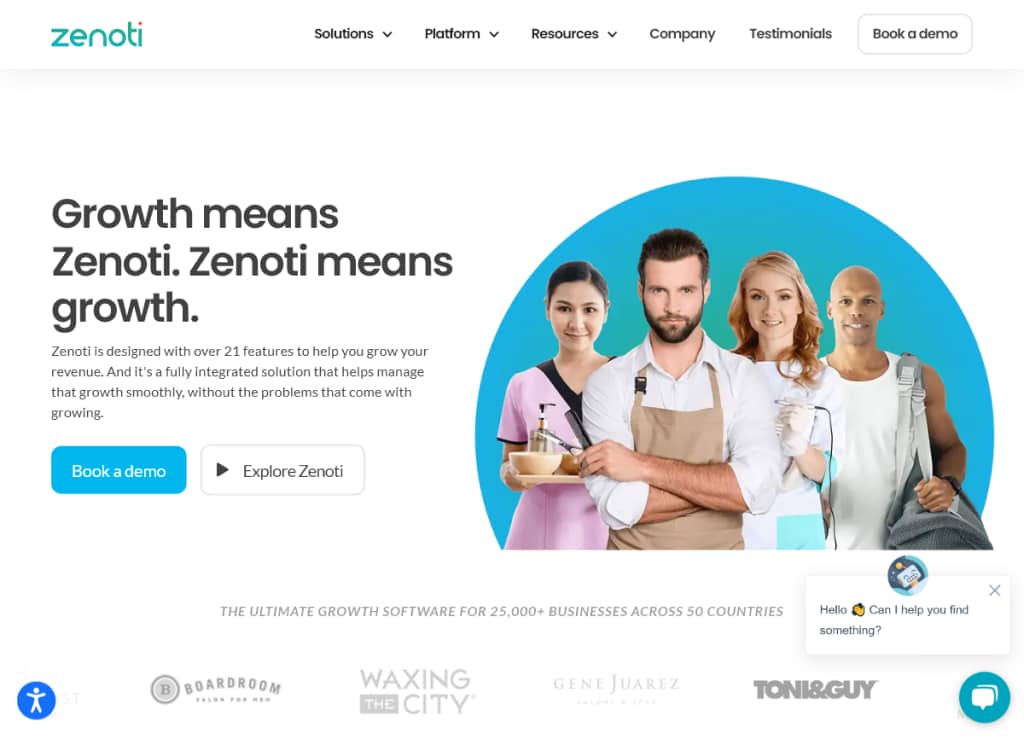
Here’s the thing: Zenoti suffers from what I call “legacy software syndrome” – build it once, keep it running, add features occasionally, and market aggressively. The result? A platform that feels stuck in a time capsule from the early 2000s.
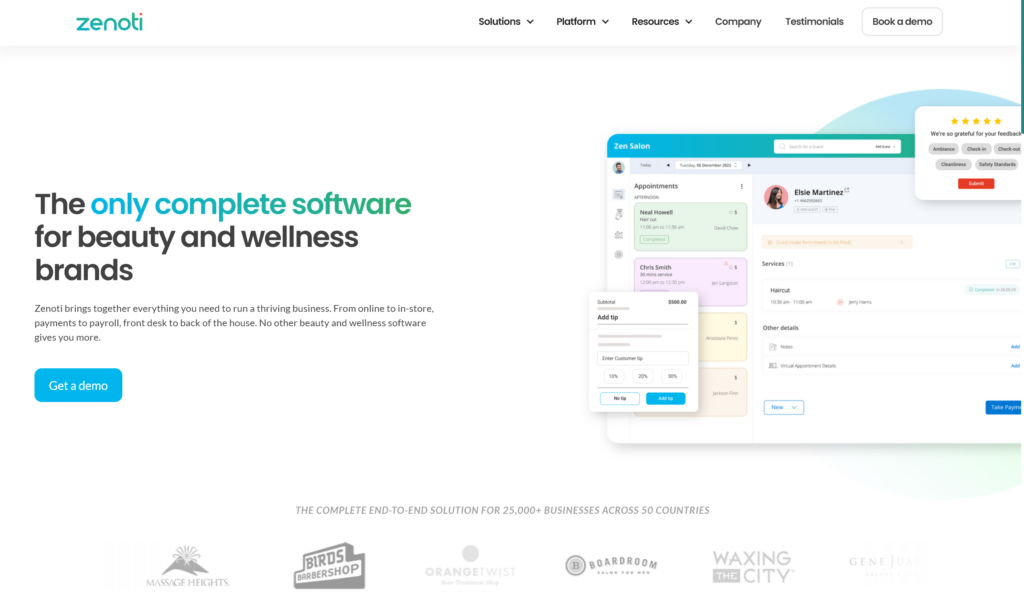
The desktop interface is plain and dated, with features buried in nested menus. Ironically, their iPad app looks modern and sleek – it’s what you see plastered all over their marketing materials.
Fun fact: During my demo call, I actually thought they were showing me an older version of the software – that’s how different the desktop experience is from their marketing materials. And speaking of the demo call, you’ll need one just to get basic pricing information, as pricing is nowhere to be found on the Zenoti website.
Despite these quirks, Zenoti maintains surprisingly positive ratings across review sites. Users seem willing to overlook the dated design and learning curve, focusing instead on the robust functionality.
Zenoti is just one of our top salon software picks for this year. To see our choices for the best salon software, check out our full list here.
So, Is Zenoti the Best Salon Software for Me?
So let’s break this prospect down for a second.
Perhaps there’s a bit of copium going into some of those review assessments, considering once you sign up, you’re locked in for 12 months, and no one likes coming to terms with buyer’s remorse.
Or maybe there are a lot of business owners who haven’t had the chance to try a ton of the other salon software options available these days.
Either way, the reviews for the Zenoti mobile app on the Apple App Store (2.5) and Google Play Store (1.4) paint a very different picture — coming in at less than half the score of the reviews on sites like G2 and Software Advice (more on that later.)
Now, I’d be lying if I said that the desktop app experience in Zenoti isn’t an improvement over Booker and Mindbody in a lot of ways.
But if I’m being honest, that’s a pretty low bar.
The real truth is that most salon and spa software still feels stuck in the dark ages of early Web 2.0 — and if the entire host of front-runner options looks similarly bland and poorly designed, where’s the incentive to modernize or improve?
Look, Zenoti will get the job done. It won’t look good doing it, but it will function as needed for your standard salon or spa management needs. The functionality is there, and you could absolutely do worse, but…
You have to be 100% sure that this is THE software solution for you before you sign on the dotted line — because you’re going to be locked into Zenoti for at least the next year, and you won’t be able to click a single button inside of the app until you sign that contract.
For my money (and yours), there are definitely more streamlined, simple, and modern salon software options available at that $300-$600 price point that offer the same or better features and don’t require you to be locked in for a year.
But, if you want a salon software option that gets the job done, rarely goes down, and has all the tools you need to run your business, then Zenoti might be a good choice for you.
Zenoti is my recommendation for business owners who want a highly-detail-oriented piece of salon and spa software that offers deep data insights and great reporting and who need in-depth reputation management tools to build their brand online.
Zenoti is just one of our many top salon software picks for this year. To see our full list of the Best Salon Software, check it out here.
Zenoti Pricing
Zenoti Monthly Plans
Zenoti doesn’t offer traditional monthly plan pricing.
In fact, they intentionally don’t list pricing anywhere on their site.
As was the case with Mindbody, you have to submit your contact information via a demo request form on Zenoti’s website and wait to be contacted via phone by one of their sales representatives before you can find out a single detail about Zenoti’s pricing.
I received a call within 24 hours.
In this first touch call, you will be asked for basic details about your business, specify the number of locations you have, and detail your most desired features.
Here’s where we circle back to pricing.
It was on this first call that I first had the chance to ask for a breakdown of pricing plans.
I was told that Zenoti doesn’t offer monthly plans but that I should expect to pay somewhere between $300 – $500 per month for a single-location business.
When I asked for clarification, I was told that Zenoti charges by location rather than by plan, and there are individual add-on features that can be added to your monthly fee either a la carte or bundled into an add-on package with other paid add-ons.
Confused yet? I am.
So, to summarize, according to Zenoti’s sales team:
- There is no “plan pricing” listed anywhere to base your purchasing decision on
- There is no itemized list of fees to give you as a potential business customer
- Pricing is determined on a “per-location basis”
- There are also “packages” that include bundles of features you can pay extra for
This is by far the most convoluted and confusing method of salon software pricing I have ever seen.
At the end of the intro call, the sales representative scheduled my demo with one of Zenoti’s account executives and one of their senior sales engineers.
On the demo call, I was shown a presentation with features and benefits before being shown a “custom pricing” slide that listed three “recommended package options.”
“Recommended Option #1”
$350 (per month, per location) — includes
- “Salon Core Package”
- ezConnect (two-way SMS feature)
- 7500 marketing emails
- 1000 marketing texts
“Recommended Option #2”
$450 (per month, per location) — includes
- Everything in Option #1, plus
- “Marketing Plus Package”
- Custom-branded client-facing mobile app
- ezRepute (review management feature)
“Recommended Option #3”
$500 (per month, per location) — includes
- Option #1, plus
- Smartbot (AI powered chatbot feature)
Please keep in mind that the options above were described to me as “custom pricing” based on my business needs and do not necessarily reflect the price you will pay.
Zenoti is very secretive about their pricing, and I cannot guarantee that the pricing options they provided to me as a potential customer are the same as the ones they will offer you because Zenoti refuses to commit to standardized, transparent, and well-communicated pricing.
Zenoti POS & Credit Card Processing
Zenoti offers rather flexible POS and processing options.
You can choose from a range of terminals directly through Zenoti, or you can use third-party POS hardware solutions such as a Clover POS device. Either way, you can process payments through the Zenoti desktop web app without the need for manual reconciliation at the end of the month.
My real gripe is with the checkout screen in the desktop app itself. Initiating checkout opens a separate browser window where you will need to process the transaction. This choice is baffling to me, and it offers a far worse checkout experience than any other software suite I’ve tested.
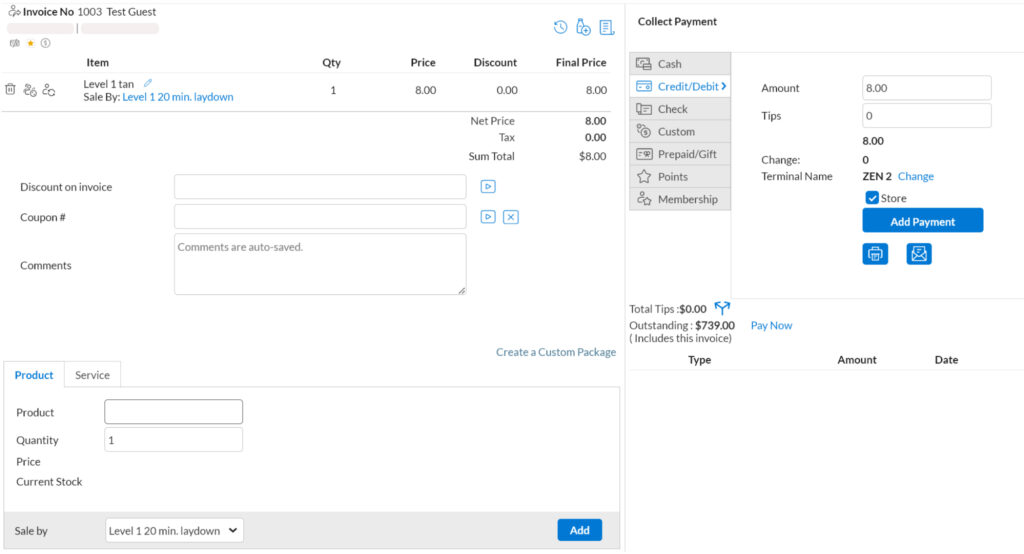
It should be noted that payments through a Clover terminal or similar third-party POS devices are not done via direct integration, but they process the same as standard payments and pose no additional work (outside of a couple extra clicks at checkout).
You can also use an iPad or Android device as a POS terminal by connecting it to your system and using Zenoti’s customer-facing iOS app to allow clients to checkout.
The platform also offers industry-standard features like multi-merchant accounts and direct deposit.
For a closer look at the best salon POS and credit card processing options available right now, take a look at our list of the Best Spa and Salon POS Systems and check out the Best Credit Card Processors for Salons & Spas.
Zenoti Payments
Zenoti also offers a first-party integrated payment processing service called Zenoti Payments.
Features include an auto-update feature for card expiration dates, global card access (once a card is stored, your customer can use it at any of your locations without reentering their information), built-in dispute management, auto-reconciliation, and more.
This service collects payments through your Zenoti system and organizes payouts that are deposited into your bank account, similar to offerings from competitors such as Boulevard Payments or Mangomint Pay.
Credit card processing rates listed below are what customers can expect if they decide to sign up for Zenoti Payments:
| Card Present | Card Not Present | |
|---|---|---|
| All cards except Amex | 2.45% + 10c | 2.95% + 10c |
| Amex | 2.95% + 10c | 3.25% + $0.10 |
| Non-Amex Downgrade fee* | 3.35% + $0.35 |
Zenoti claims affordable and competitive credit card processing rates even if you do not choose to use their first-party payment platform. Those charges will be shared below as soon as they are made available by Zenoti.
Zenoti Premium Add-ons
Zenoti offers a handful of paid add-on features that can be purchased a la carte alongside your monthly fee or bundles as “packages.”
The full list of add-on features is listed below.
Please note that all add-on features are the technologies of Simplified.io and are licensed by Zenoti for implementation in Zenoti apps. All listed premium add-on features below are not developed or maintainted by Zenoti.
ezConnect – In-App Two-Way Text Messaging: $29 – $169 per month per location
ezConnect is Zenoti’s integrated two-way messaging suite feature.
A la carte pricing is broken down into four tiers based on the level of platform functionality you wish to include.
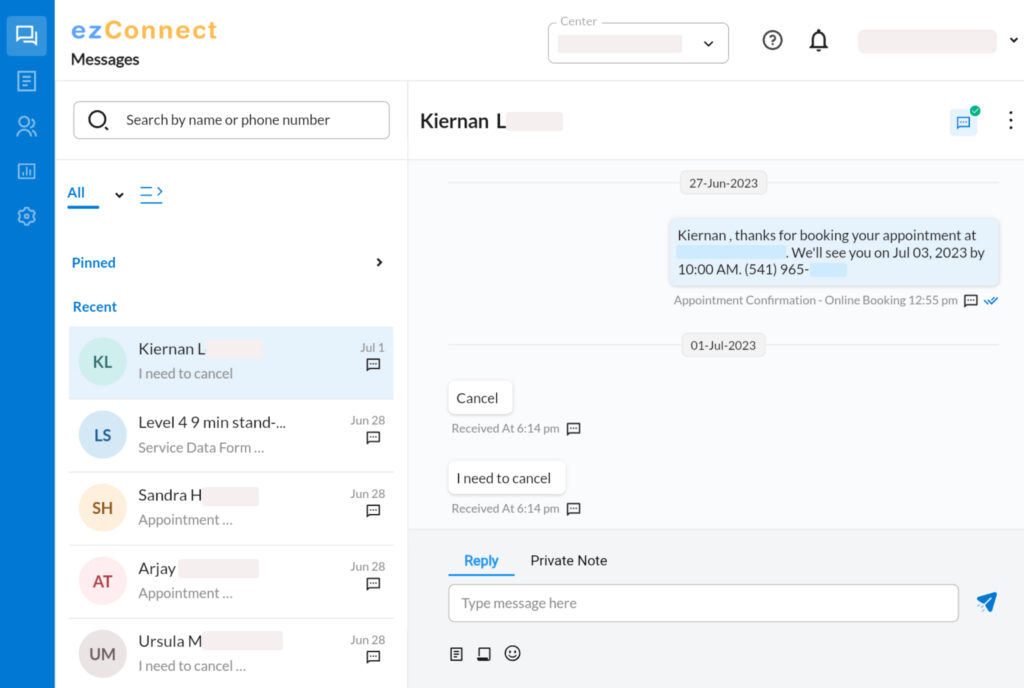
WhatsApp Only: $29 per month
- Includes 1000 templates
- Share files
SMS only: $139 per month
- Auto assignment of chats
- Private messages
- Guest details widget
- In-app appointment functionality
- Saved responses
- Off-hours controls
SMS + MMS: $169 per month (US & UK only)
- Send & receive images & PDF documents
- Customers can view their files
- Share files with clients
- Supports images (up to 5 MB)
- Supports PDFs (up to 600 KB)
SMS + WhatsApp only: $169 per month (some countries excluded from each)
- Two-way SMS
- Includes 1000 templates (via WhatsApp)
- File sharing
Features:
- Integrated 2-way texting: Let customers connect with your staff via SMS or MMS
- Allows staff to pick up conversations and respond instantly
- Customers can cancel, reschedule, or early check-in for an appointment
- Complete visibility into guest’s profile, upcoming and past appointments, and membership information
- Quick search, add customers, and message from your appointment book or ezConnect browser window
- Send appointment reminders and post-service care tips and build lasting relationships with guests
- Set keywords and notifications to ensure high-priority tasks get completed fast
- Reusable templates for standard queries and FAQs
- Set autoresponder to send standard replies outside business hours and on holidays
ezRepute – Reputation Management Suite: $189 per month per location
ezRepute is Zenoti’s premium reputation management feature suite. Business owners can use it to monitor feedback, catch and respond to poor reviews, prompt customers to share their positive experiences, and more.
The feature has a “Light” and “Pro” tier. In the Zenoti app’s Marketplace, I was only able to find pricing information for the “Pro” tier. Pricing is listed as follows:
Features:
- Manage and respond to all reviews from Google, Facebook, and 250+ other sites
- Solve guest issues and track and increase Net Promoter Score (NPS)
- Highlight your best reviews on social media to boost SEO and SEM
- Create listings for all locations on Google My Business, Facebook, Bing, and 50+ other sites
- Automatically update business name, address, and phone number for all locations on 50+ sites to improve SEO and brand consistency
- See how guests and prospects engage with your business on Google (Calls, directions, website visits)
- Uncover trends, strengths, and weaknesses across the guest interaction process
- Customer feedback with Natural Language Processing
- Analyze your competitors’ data on review sites
- Compare sentiment for products and services against industry leaders at a brand, national or local level
- Measure your competitors’ NPS to learn what drives guest satisfaction
Smart Bot (Web / IVR): $150 – $400 per month per location
Zenoti’s Smart Bot feature is an AI-powered chatbot with a host of features that allow it to respond to frequently asked questions, check your schedule, automate booking, rescheduling, and cancellations, and make recommendations.
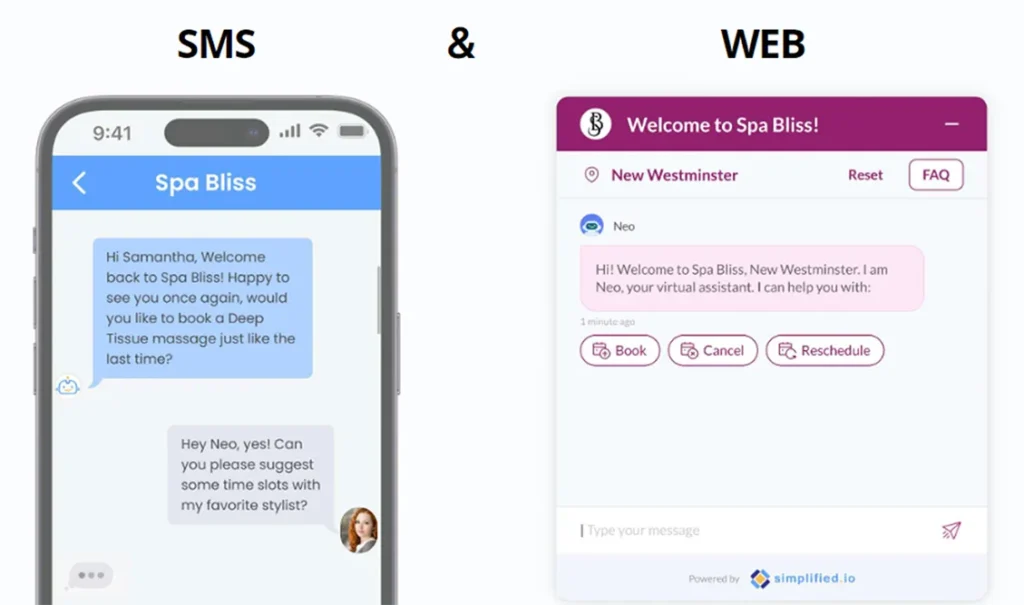
Features:
- Drive contextual conversations with a fully automated bot
- Resolve customer queries about your store timings, services, and products instantly
- Attend to your guest requests within 30 seconds
- Automate booking, rescheduling, and cancelation requests
- Reflect your own brand and update with all your locations
- Run announcements, promotions, and discounts on your services
- Recommend services, stylists, and appointment slots
- Capture every call
- Allow guests who call your business to get assistance from SmartBot instead of waiting
- Lower your chances of losing customers to long hold times or missed calls
- Assist customers who call outside of business hours or during holidays
- Smooth and transparent handover to an “agent” if the Bot is unable to assist
- Staff will be notified when their guests need the human touch and will have instant access to guests’ chat history
ezPulse – Employee Performance Tracking Suite: $49 per month per location
ezPulse offers a host of tools and dashboards to track and analyze employee performance.
Features:
- Track performance in real-time with key metrics
- Track KPIs by centers/employees
- Compare performance over time
- Drive healthy competition with employee rankings
- Acknowledge top performers and coach employees for better outcomes
- Share instant feedback with in-app messaging
- Take timely action on negative trends
- Coach your teams with issue-specific solutions
- Define goals for your location and teams, monitor progress, and share real-time feedback
- Set goals for your center and providers
- Empower your teams to track progress against their goals
- Drive healthy competition with provider rankings
Credits (Email & SMS Marketing Campaigns)
Zenoti requires customers to purchase credits to use for email or SMS campaigns, and offers them in bundles:
Email Credits:
- 10,000 email credits: $200
- 50,000 email credits: $500
- 100,000 email credits: $900
- 300,000 email credits: $1,500
SMS Credits:
- 5,000 SMS credits: $180
- 10,000 SMS credits: $300
- 25,000 SMS credits: $625
- 50,000 SMS credits: $1,000
Other Costs — Mandatory fees paid at time of sign-up
Professional Services Fee — $1,000
This fee includes configuration of the Zenoti platform with service, product, customer, and employee lists, liabilities (gift card balances, membership benefits, package credits, setup of online booking), and mobile app and virtual training.
Data Migration — $1,000
If you are able to get admin access to your old platform, your Zenoti representative and their team will handle a full data import for a fee of $1,000. This fee includes two years of transactional data migration (only applicable to historical financial or appointment history data)
Zenoti will perform a white-glove data import and pull all available information in for you. The estimated processing time (from sign-up to launch day) is 4-6 weeks.
Who is Zenoti Salon & Spa Software For?
I recommend Zenoti to up-and-coming salon or spa businesses that absolutely need the built-in reputation management features provided by the Simplified.io technologies that Zenoti has licensed, as well as Zenoti’s robust reporting toolset that Mindbody and Booker can’t quite match in terms of customizability.
Switching to Zenoti
This is a big one for any salon software option you consider.
In fact, the number one thing holding salon owners back from jumping ship to a new booking and POS app — no matter how much they may hate their current platform — is uncertainty.
How hard is it going to be to get our entire business migrated over into a new booking system, and how long will it take to get up and running?
You can’t just pause your business, so any scheduling software should be able to get you fully integrated and ready to book with no downtime.
As we touched on earlier, the process of switching over requires roughly a minimum of a month — 4-6 weeks total — that includes historical transactional data migration, platform configuration, data import, and training.
Zenoti offers white-glove data migration services, meaning that their team will handle importing and formatting your data to reduce the friction of switching systems, a welcome option that older competitors like Mindbody and Booker can’t quite match.
What Data Can Be Imported Into Zenoti From My Old Booking System?
The following data can be imported into Zenoti:
- Appointment history
- Future appointments
- Credit card data
- Services
- Products
- Client data
- Employee data
- Gift card balances
- Membership benefits
- Package credits
Not everything from your old system can necessarily be imported into Zenoti. According to the sales engineer we spoke to at Zenoti, internal client notes can not be brought over to Zenoti.
Does Zenoti Make You Sign a Contract?
And the million-dollar question (well, $6,000-ish question).
Just like Boulevard, Booker, and Mindbody, Zenoti requires a 12-month contract.
And, just like Booker and Mindbody in particular, you don’t even get to try the software before you buy it.
No test drive. No free trial.
That’s right, just like Booker and Mindbody – you have to sign a year-long contract before you can even log in to Zenoti for the first time.
All you get as a business customer is a demo call and a slide show to make a decision that will impact the success and well-being of your business over the next 12 months.
Echoing our sentiments shared in the reviews for Booker and Mindbody,
Refusing to offer a trial of any kind and gatekeeping all access to the platform behind a 12-month contract is simply anti-consumer and unfair to business owners who are entrusting the livelihood of their salon or spa.
Forcing business owners to make a major long-term investment decision with a fraction of the information they need is no longer acceptable.
Business owners deserve the chance to confirm that a financial decision this large is the right one for their salon or spa before committing to that kind of investment.
With so many other salon and spa software options on the market right now that do offer the opportunity to try their software out for free, it’s just a shame that a company as established and mature as Zenoti (and Booker/Mindbody, for that matter) refuse to provide their potential customers the same courtesy.
Zenoti Support
*The following information is taken directly from the Zenoti support website:
Standardized response times for support requests to set your expectations
When you submit a request to Zenoti Support, we endeavor to address your problem as quickly as possible. In fact, the majority of support requests receive a response within a few minutes and are solved on the same day.
In order to ensure consistency and predictability during high volume times, your issue will be graded by severity (its impact on your business). Our response timeframe is commensurate with the business impact of your problem.
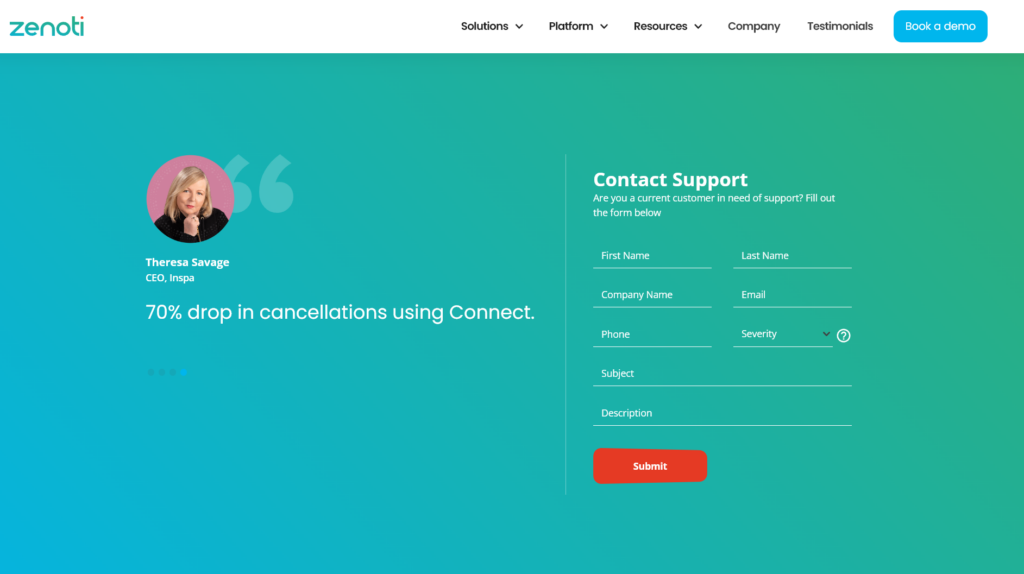
Impact definitions and response times*
| Severity Level | Impact definitions | Response times |
|---|---|---|
| Severity 1 | A Highly Critical Issue – multiple users impacted by performance or access issues, or the site is unreachable | < 30 minutes |
| Severity 2 | A Moderately Critical and Time-Sensitive Issue – Immediate impact on guest operations – Appointments, Invoice, or Guest related issue | < 2 hours |
| Severity 3 | A Non-Critical Issue or General Question | same day |
*Customers on premium support agreements have different SLA’s.
Zenoti Support by Phone
All Zenoti customers are eligible for telephone support. You can receive support through inbound or outbound calls.
Here’s how:
Preferred method: If possible, initiate a chat conversation through the messenger and request a phone call. Provide your phone number and, if necessary, any availability constraints.
Initiating a call request through the messenger automatically provides us with important details such as your name, center, organization, and more – which avoids us having to collect this information by phone.
Alternate method: You can contact Zenoti directly by calling one of the regional support numbers. The list of numbers is below.
If there is no number listed for your region, we apologize that you may need to place a toll call. You are welcome to request an outbound call via the preferred method listed above, at no cost to you.
| Location | Support Number |
|---|---|
| Australia (Brisbane) | +61 261450267 |
| Indonesia (Jakarta) | +62 2129887972 |
| United Kingdom (Manchester) | +44 20 3966 8505 |
| United States (Seattle) | +1 425 654 0445 |
Zenoti Software Features
The remainder of this article will walk you through a detailed look at the features and tools offered by Zenoti.
The intent of this review is to allow you to experience what it’s actually like for your business as a Zenoti customer and to better understand if the platform offers the tools and support you need to grow and succeed.
You can use the links below to navigate directly to the topics that are most relevant to you.
- Integrations
- Online Booking
- Appointment Calendar
- Client Data Management
- Appointment Notifications & Alerts
- Email and Marketing Tools
- Smart Marketing
- Staff Management
- Business Reports
- Inventory Management
- Memberships, Packages, & Gift Cards
- Point of Sale (POS) Options
- Mobile Booking App
Zenoti App Integrations
Integrations available to customers through the app settings are very limited in Zenoti.
From the Organization settings menu, business owners can set up accounting integrations through Quickbooks or Xero, as well as integrations with apps like Smartkart and Wisely.
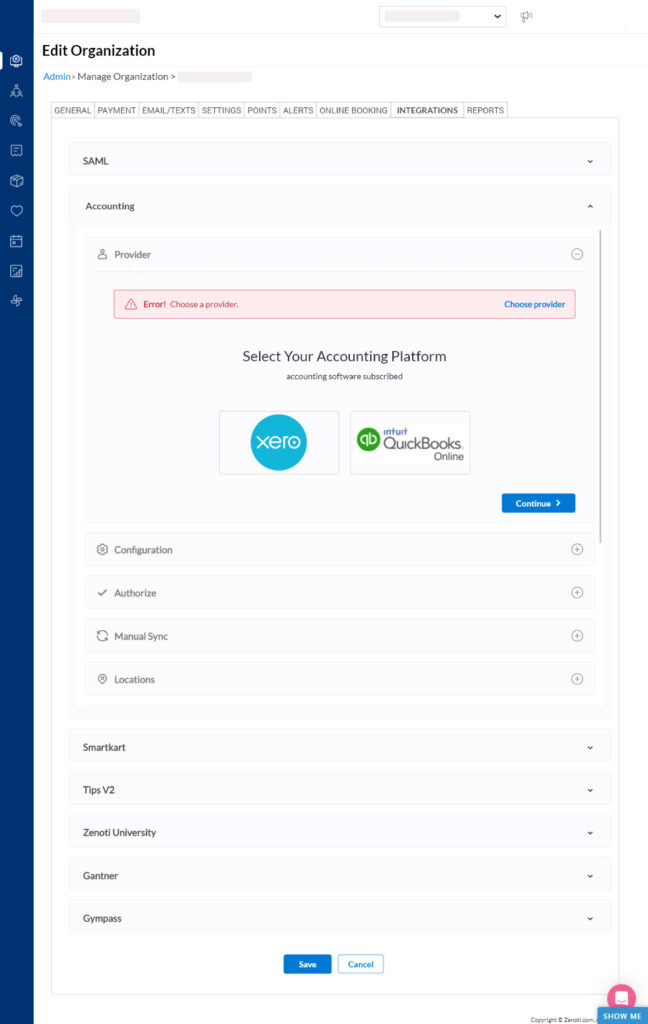
Zenoti’s website boasts a whole host of other integration options, including Oracle Netsuite, Run by ADP, Vish, Aveda, Zoom, SAML, Opera, and more, but all of these will require assistance from Zenoti’s team to set up via their open API.
Zenoti Online Booking
Zenoti touts their online booking capabilities as their “bread and butter.”
Literally.
That’s the exact phrasing their representative used to describe the feature to me.
While online booking is table-stakes for any salon or spa software suite in the 2020s, there is a HUGE difference between good online booking and bad online booking.
One of my sticking points with some of the other salon software options I’ve reviewed recently was how online booking was implemented.
Booker’s standard online booking experience is a “Book Now” button that lives on your homepage and redirects to Booker’s online booking site — an underwhelming and clunky experience that feels a bit hacked together, especially for a software suite so mature.
Likewise, Mindbody’s online booking options are a bit of a mess as well. In fact, aside from setting up a custom API to create a branded online booking interface on your business website or upgrading to a plan that includes Mindbody’s “Branded web tools,” there appears to be no direct way for your business to offer online booking.
With Zenoti, online booking is streamlined as an included feature that you have some customizability and control over.
In the online booking settings menu, you can customize fonts and color codes, add your logo and other basic details, as well as choose which services and staff members you want to be bookable online. You can also choose whether you wish for products, memberships, and packages to be purchasable online.
Zenoti also offers service customizations so that clients can add on and customize their services when booking online. Add-on services can be specified and customized in the settings.
You can easily set up an online booking widget that lives on your website so clients can book directly from your webpage without being redirected to a seemingly random (or suspicious) URL – at least, that’s what I was led to believe on the sales call.
What actually happens is very VERY similar to what Booker and Mindbody do – redirect from the Book Now button on yoursalonname.com to yoursalonname.zenoti.com/webstoreNew/services/4647649a….. where the client is presented with an online booking menu.
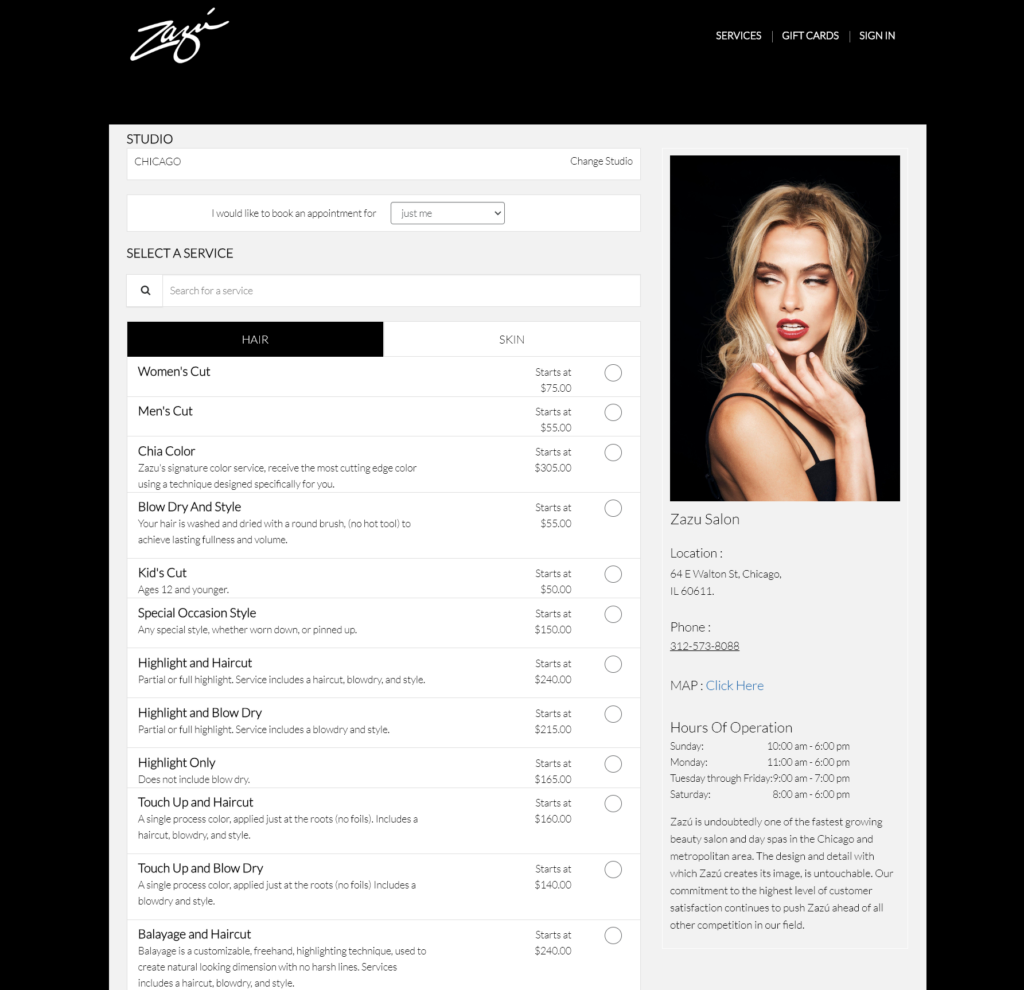
It’s branded, but it definitely does not live on your website.
Despite the fact that I brought up how that exact redirect issue was a sticking point when I was previously using Booker, how I’d like to avoid that in the future, and how important keeping online booking on my site was, the sales engineer I spoke with glossed over that detail while demonstrating Zenoti’s online booking capabilities immediately thereafter.
Zenoti Appointment Calendar / Scheduling
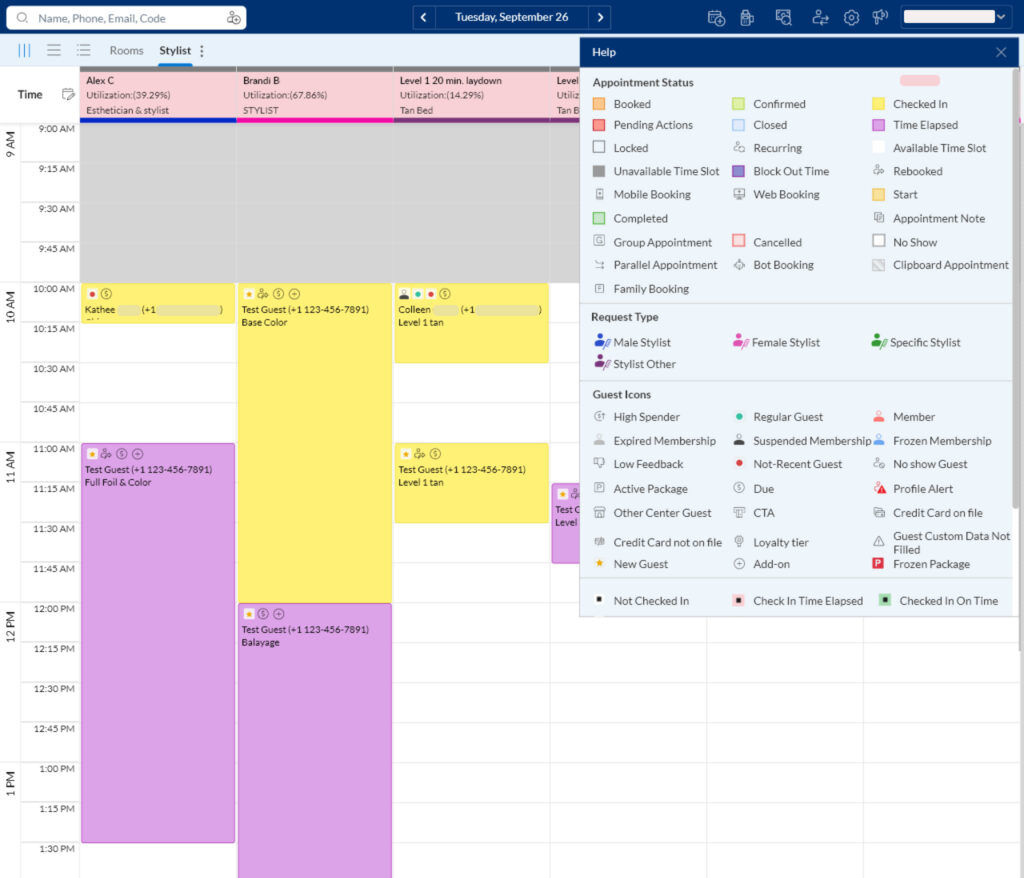
As was the case with Booker and Mindbody, Zenoti’s calendar screen, menus, and overall user interface look drab, boring, and outdated, even by the standards of the previous decade. The humdrum navy blue navbar and Excel spreadsheet-looking calendar don’t exactly scream “modern” or “chic.”
My real issue is how unintuitive Zenoti is to navigate.
For starters, none of the navbar icons are accompanied by text, so new Zenoti users are up against a learning curve that includes memorizing each (inexplicably tiny) icon’s meaning while hovering over the icon for the pop-up text label. It’s not a dealbreaker, but it’s also an oddly frustrating choice that made navigating to the menus I needed more of a chore than it should have been.
Zenoti also falls prey to pop-up syndrome.
So many menus open into an entirely new browser window, forcing you to juggle tasks in separate places with a real mess on your hands (and screen).
That aside, let’s focus on the calendar itself.
Zenoti’s calendar is versatile but strange.
Every salon and spa software suite I’ve ever tested arranges the calendar into columns for each staff member (and room, bed, or bath in the cases where resource scheduling is an option).
For some reason I have yet to understand, the default view of the calendar is arranged horizontally instead of vertically.
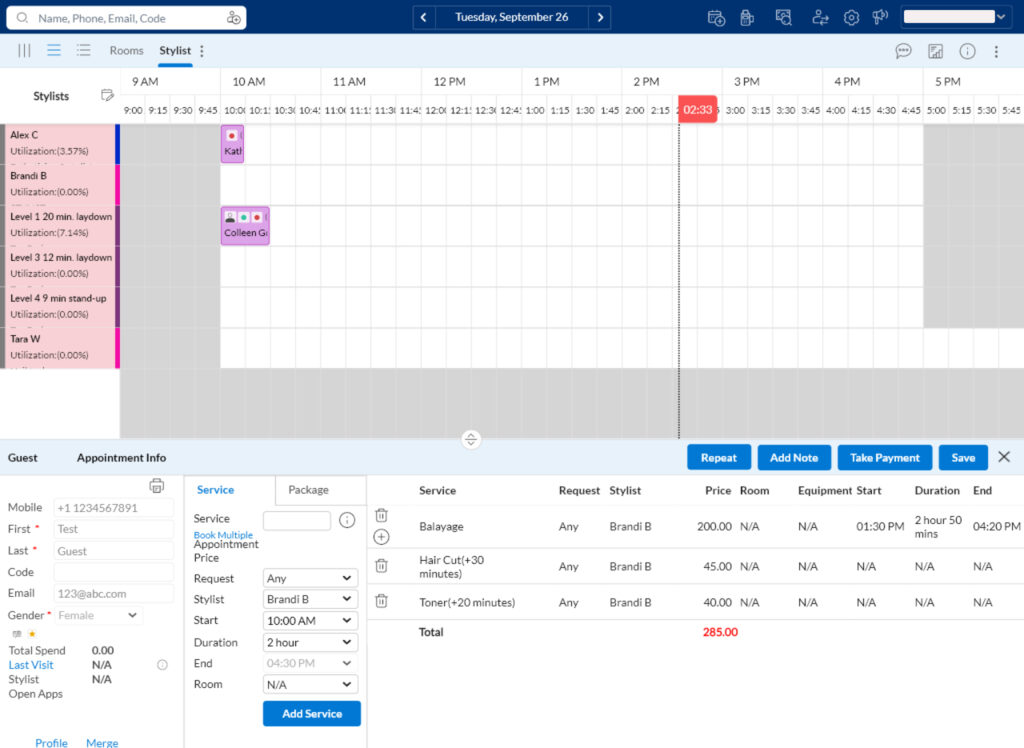
This means that the timeline of appointments runs from left to right, with each fifteen-minute increment broken down into its own column, and each staff member’s schedule occupies a row, making employee and appointment information impossibly cramped by default.
I have never seen this approach to a calendar in a piece of booking software before.
After spending an hour or so attempting to book appointments and fiddle with the schedule and just moments before I was ready to pull my hair out, I discovered that a standard “Vertical view” option exists… As quickly as my mind had registered the meaning of the three vertical lines nestled in the upper left-hand corner of the screen, I changed the view and never looked back.
Au revoir, horizontal booking. Let’s never do this again.
The standard view operates similarly to other software suites we’ve covered here on The Salon Business, but with some unique quirks that I have mixed feelings about.
For one, simply clicking on the schedule once does nothing.
To book an appointment, you must double-click on the calendar or enter the client’s name into the search bar in the top left of the screen, locate their contact details on the dropdown menu, and select “Book Appointment.”
You can also select the “Booking Wizard” button at the top of the screen if you want to take the longest and most convoluted route to appointment town.
The Booking Wizard is an interesting feature… First of all, it opens up in a separate browser window — off to a weird start.
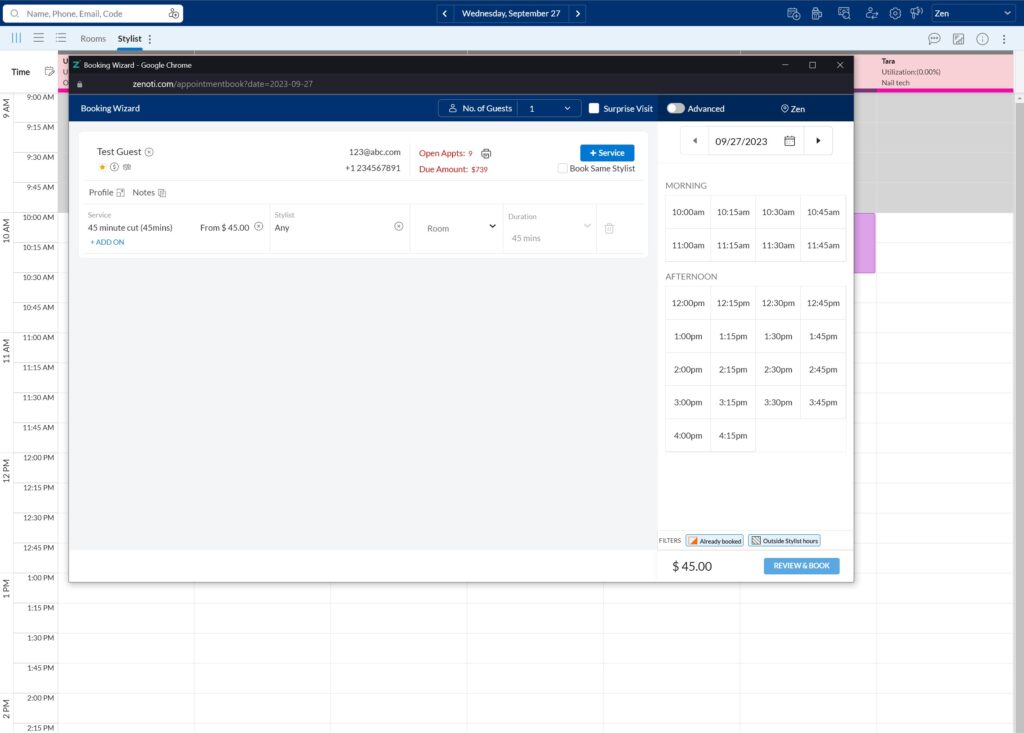
Once open, it presents you with an interface that is more reminiscent of ordering through Doordash or booking a reservation through Opentable than it is booking an appointment in salon software.
The only concrete benefit of the Booking Wizard over the standard calendar is booking appointments for groups, since it allows you to book multiple appointments at the same time
That said, it is functional, if less convenient than the other two booking methods mentioned above.
There is one final view option for the calendar: List view.
The List view forgoes a calendar entirely and instead lists only the appointments booked for the day in rows broken down by start time. From this view, you can expand and collapse each hour as well as each appointment and see the booking details and client information for each.
Zenoti Client Data Management
I’ll be honest, managing client data is a pain in Zenoti.
Just finding my client information was a nightmare. There is no easily available “Clients” tab or menu from the calendar.
Digging further into the settings menu (referred to as “Manage mode”), there is no clear “Clients” or “Customers” button or tab dedicated to clients or client data.
In fact, I had to click through the entire list of menus and submenus on the “Manage mode” navigation bar twice before I finally figured out that the only way to view your client database is to select the “Loyalty” menu option, then select the “Guest” option, followed by the “Manage Guests” option.
What appears to be a Loyalty program menu is actually your client database… why???
As someone who has relied on salon and spa software to manage their businesses and who has set up and utilized loyalty programs through almost all of those software suites, this stands out as one of the most bone-headed naming blunders I have ever seen.
Here’s the kicker: There isn’t a single loyalty program option in the Loyalty menu.
The menu option is literally called “Loyalty,” and there are no options to create or manage a loyalty program in that menu.
Loyalty program settings are actually located in a separate “Marketing” tab.
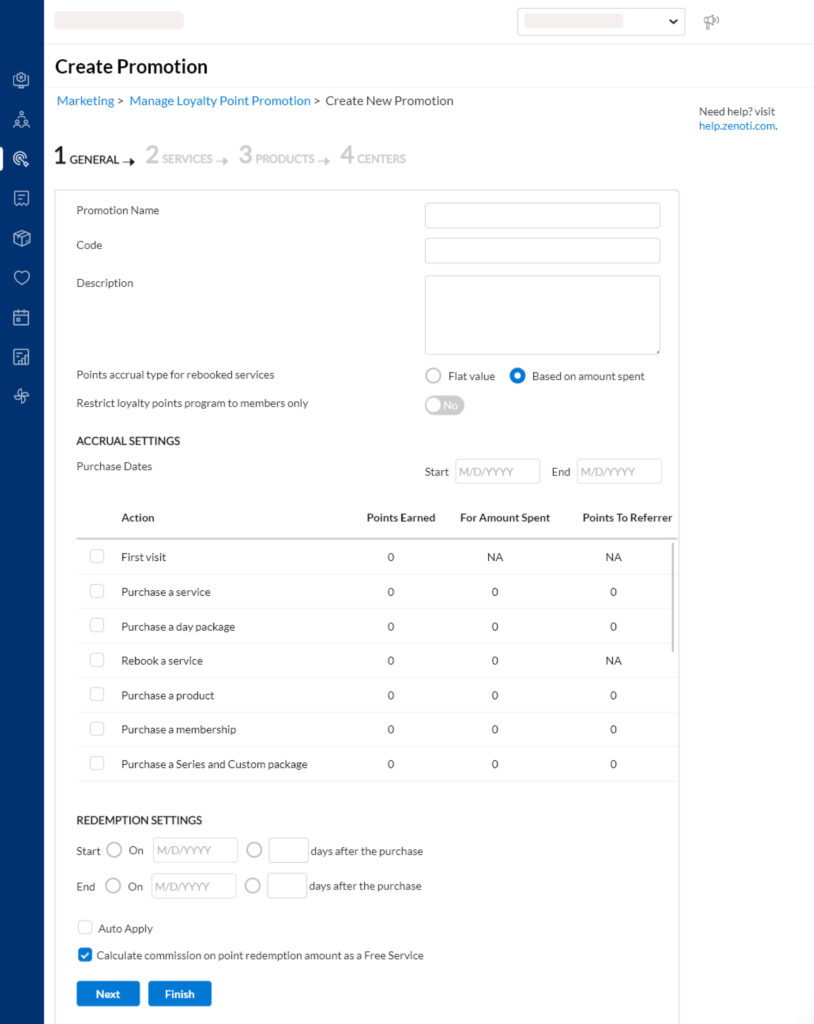
Ok, now that we’ve clarified how confusing just finding your client database is, let’s move past the rant and talk about the actual features on offer here.
Client information is laid out pretty simply, with columns for categories for first and last name, phone number, last visit, membership affiliation, category icons (for “new guest”, “package purchase”, etc), and the business location(s) they visit.
There are also three buttons above the database to export your client data to an excel spreadsheet, PDF, or CSV file.
You can search for a particular client by any of their criteria in a search bar above the database.
It should be noted that you can search for individual clients from the calendar screen by name or other criteria, but you can only view a single client record from that search, not the entire client database.
The loyalty menu also gives you the option to clean up “invalid accounts” (accounts that are missing vital information such as phone number or email address) and manage duplicate accounts.
There are also client feedback management options available in the Loyalty menu that allow you to review and make notes based on poor client feedback.
Zenoti offers more in-depth reputation management features via the ezRepute feature – a paid add-on that allows you to prompt reviews through email or SMS, automate posting your best reviews to your social accounts, and manage your reviews across all platforms through Zenoti’s marketplace tools.
Managing Client Reviews and Feedback
Zenoti provides some incredibly helpful tools for prompting, collecting, and sharing client reviews through its ezRepute add-on feature.
With this suite, you can enable settings that automate the relationship management process. For example, you can schedule automatic ratings request emails or texts to be sent to clients shortly after their visit.
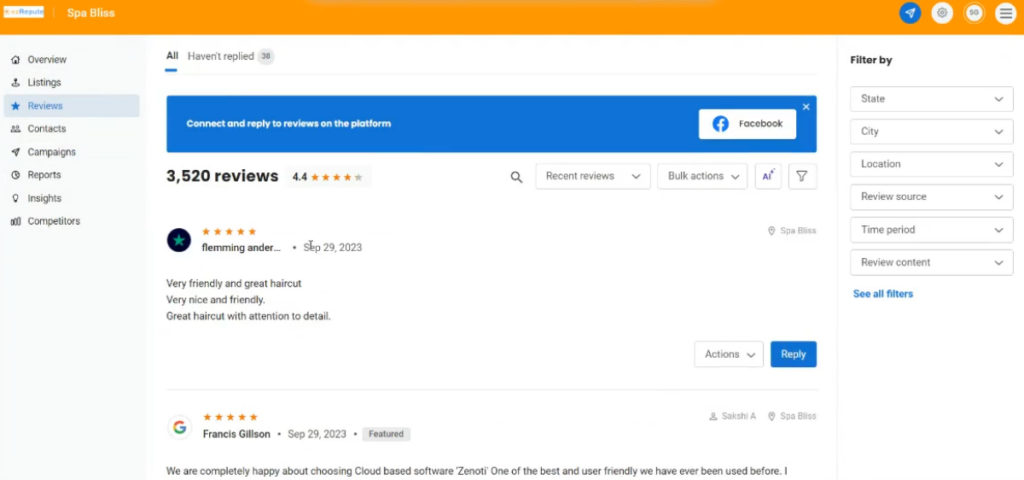
Furthermore, you can configure settings that prompt clients to post their feedback to social media sites after submitting their reviews.
ezRepute also offers the ability to automatically flag reviews with low scores, allowing you to reach out to the client and attempt to address any issues they may have experienced.
Zenoti Appointment Notifications & Alerts
Zenoti supports email and text communications for customers and staff via several triggers, including:
- Appointment cancellations
- Appointment confirmations
- Rescheduled appointments
- Appointment reminders
- Referrals made
- Thank you messages
- Waitlist notifications
- Payment disputes
- Appointment checkins and completions
- Password resets
- Birthday messages
- Coupons
- Loyalty points status
- Membership statuses, balances, and collections
- Package payments and updates
- Online booking notifications
- Password resets
- Auto-pay updates
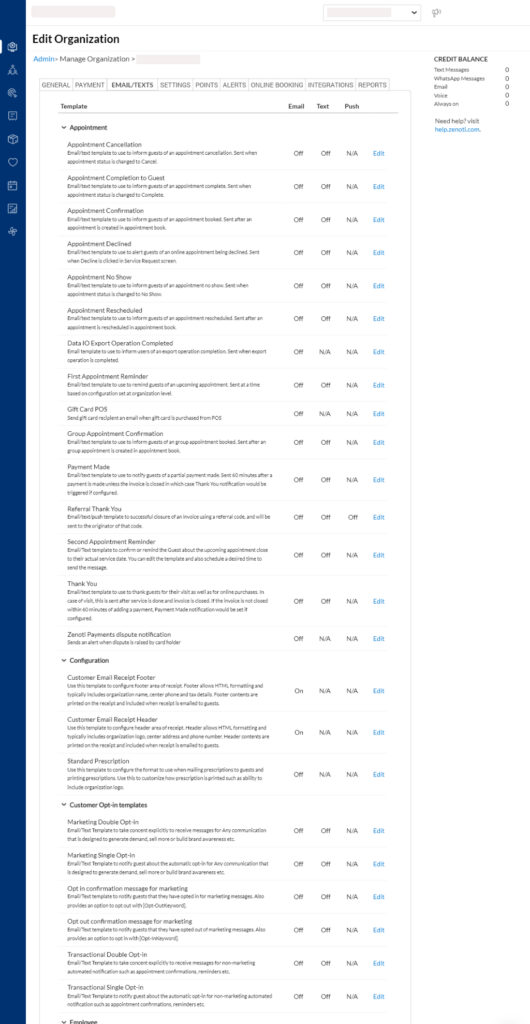
Zenoti 2-Way Client Communication – ezConnect
Zenoti offers a two-way SMS add-on feature called ezConnect (powered by Simplified.IO).
This allows you to track and respond to text messages with your clients, including automated reminders and promotions.
When a client texts, you can respond by clicking on the ezConnect icon, which opens the ezConnect interface in a separate window. Client conversations are listed on the left side of the window — clicking on any one of them opens up the entire conversation thread with that client.
Just like an iMessage chat, you can type out replies and add emojis. You can also add macros and saved responses to use quickly in your future chats.
All automated messages will also be displayed in the chat thread with timestamps so you can see when appointment reminders and booking notifications were sent and when clients replied.
ezConnect also has its own dedicated menu options laid out vertically in a navigation bar on the left side of the window that allow you to track messaging analytics, adjust settings, set employee messaging permissions/roles, and create and manage saved responses.
Zenoti Email and Marketing Tools
Zenoti offers a built-in email marketing suite that allows you to build custom emails either from scratch or from their library of templates.
The configurator is very similar to competitor email marketing suites we’ve covered in Boulevard, Booker, and Mindbody.
Simply drag and drop content blocks from the left side of the screen onto the email to add images, text, buttons, banners, and more to the email.
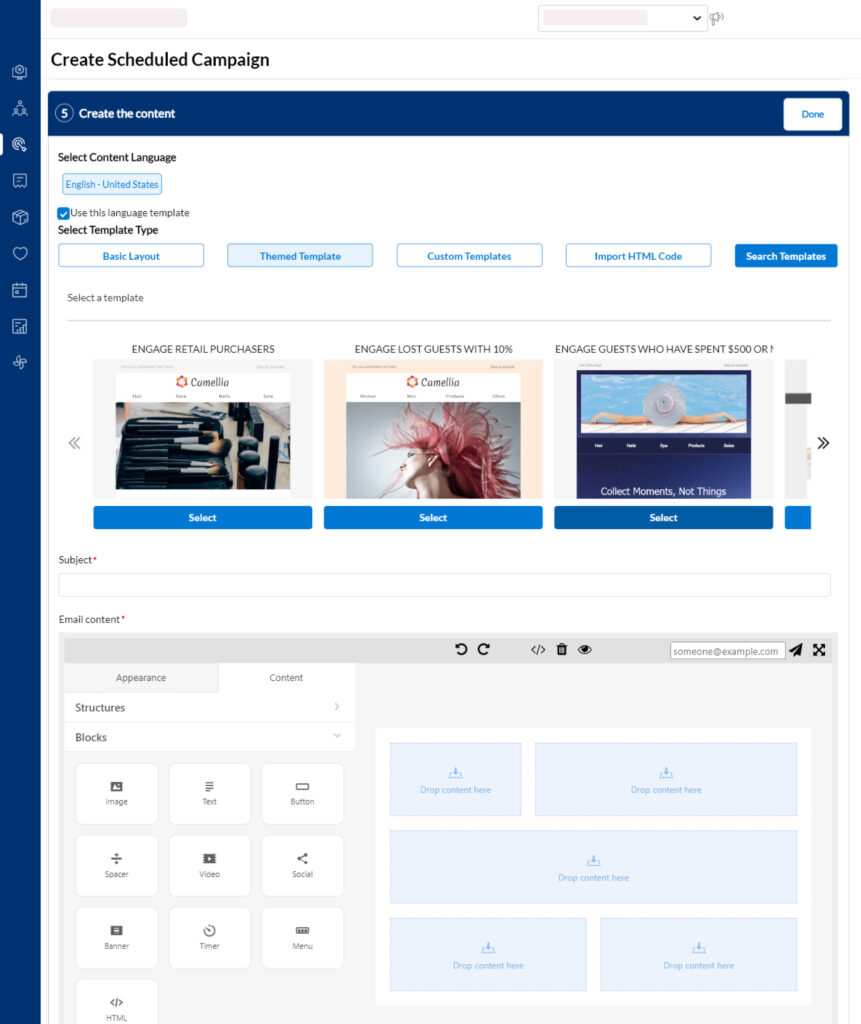
Build something you like? You can save custom themes from your best emails and reuse them in the future.
If you’re a pro, you can also opt for the advanced email builder or import custom HTML.
Campaigns can be customized to run on a scheduled or always-on basis, and recipient audiences can be tailored based on a pretty extensive list of criteria, including feedback, marketing metrics, and more.
Industry-standard SMS marketing tools are also available from Zenoti.
Zenoti Smart Marketing
Zenoti has recently added Smart Marketing, an AI-driven tool designed for salons and spas. This feature expands on the standard email marketing capabilities:
- Uses algorithms to analyze guest visit and spending behavior
- Predicts business availability in upcoming days and weeks
- Identifies the number of appointments to fill and customers to target
- Sends personalized emails based on individual customer journeys
The system is integrated with Zenoti’s platform, utilizing data from online booking, POS, employee performance, analytics, and CRM.
A Smart Marketing Dashboard is included, providing KPIs and ROI metrics for ongoing campaigns. This allows business owners to monitor and adjust their marketing strategies.
Zenoti Staff Management
Zenoti’s staff profiles are extensively customizable, including fields to detail everything from basic info to mandatory break intervals, special leave days, salary and compensation details, and culture and language preferences.
All these details can be edited in the Employee tab of the Manage Mode screen.
You can also set permission levels and roles for each of your employees so that access is only granted to certain menus, functions, and information (including client data).
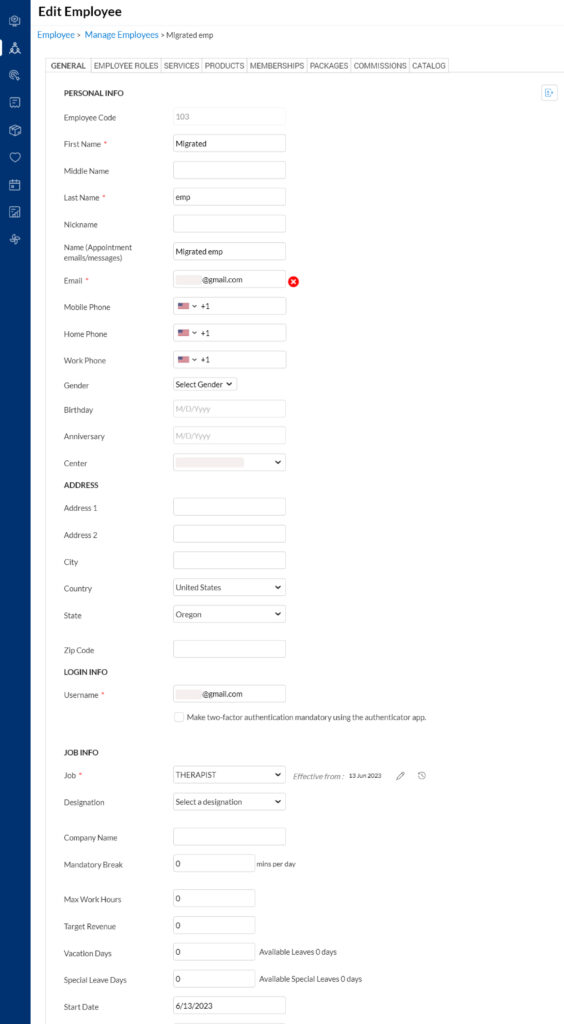
This means you can also define staff member “levels” and according prices to differentiate your senior, master, or director-level stylists and colorists.
Zenoti allows you to set employee schedules for the Day, Week, or Month from one centralized location and then copy these schedules forward to a number of days, weeks, or months.
You can create and schedule unlimited employees in Zenoti — you are not price-restricted by the number of employees (Zenoti charges by number of locations instead). Please note that if you have more than 50 employees in the system, you will not see any employees listed in the Schedule menu by default.
Zenoti Business Reports
Zenoti has quite a robust set of reporting options, with more than 400 reports available.
Zenoti’s reporting tools allow you to bookmark the reports you want quick access, show and hide columns and create and save custom views, filter information, and add columns (with custom calculations if you want).
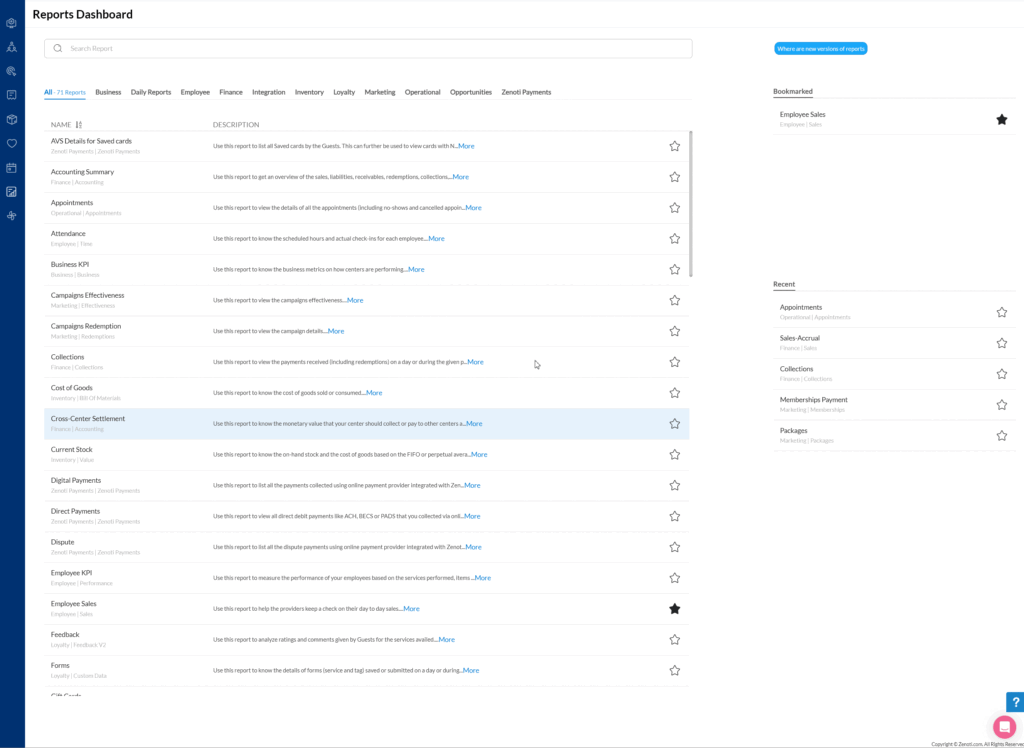
Employee KPI reports are available as well to help you identify performers and grow staff members through the ezPulse premium add-on feature ($49 per month per location).
Guest satisfaction reports are also available — These historical reports show trends in service visits, guest feedback, and tags that are cited when reviews are submitted (e.g., happy vs. unhappy visits), issue tracking (issues that are created and resolved), services that are more getting more negative feedback so you can coach on that service (these reports are available through a combination of data aggregated via Zenoti’s premium ezRepute and ezPulse add-on features).
Zenoti Inventory Management
Zenoti has product controls that allow you to create and edit vendors, SKUs, online webstore catalog entries (with fields to specify meta keywords, page titles, meta descriptions, and YouTube video IDs), product variants, product barcodes, commission types, and more.
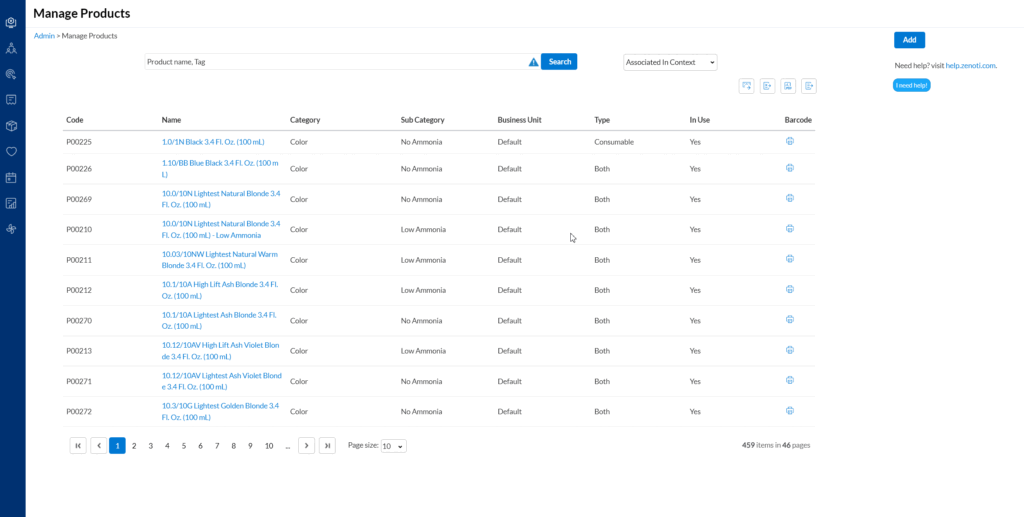
You also have the ability to create and receive purchase orders and transfer orders, as well as set low-stock alerts.
Inventory can be run, and partial and full audits can be conducted within the software as well.
Memberships, Packages, & Gift Cards
Memberships, packages, and gift cards are all available with Zenoti.
Memberships can include services or credits, as well as discounts on products and services.
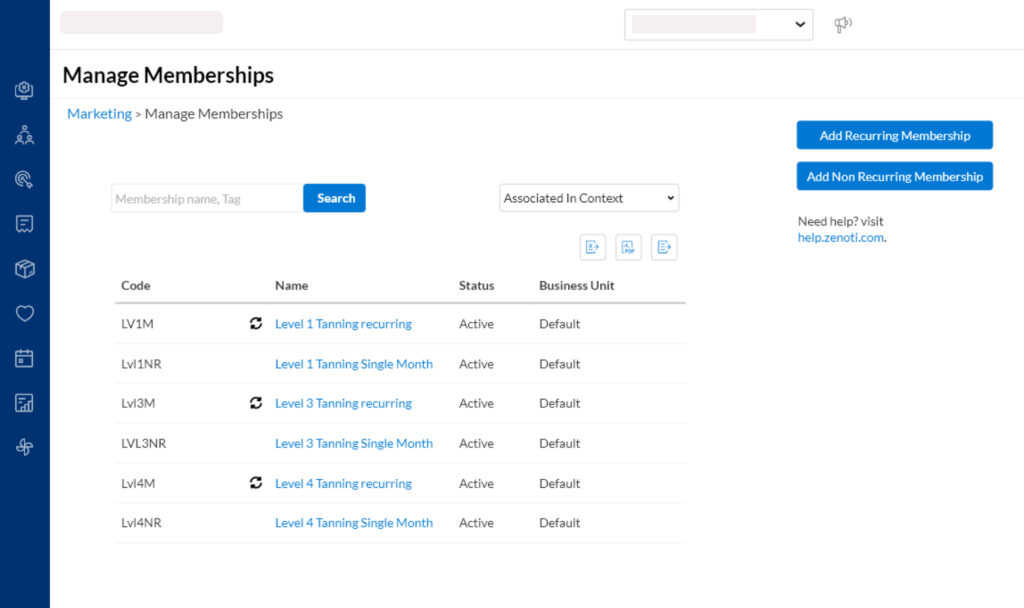
Business owners have the option to set up cancellation and freeze fees to both discourage and accommodate these requests while still protecting their business from revenue decreases associated with them.
Within your online store, membership pricing and discounts will be reflected for members when they purchase products and services.
Zenoti Point of Sale (POS) Options
As we touched on in the POS pricing section, you can choose from a range of terminals directly through Zenoti, or you can use third-party POS hardware solutions such as a Clover POS device. Either way, you can process payments through the Zenoti desktop web app without the need for manual reconciliation at the end of the month.
Third-party POS devices are not technically accessed via direct integration, but they process the same as standard payments and pose no additional work (outside of a couple extra clicks at checkout).
You can also use an iPad or Android device as a POS terminal by connecting it to your system and using Zenoti’s customer-facing iOS app to allow clients to checkout.
Zenoti Mobile Booking App
Zenoti Mobile — Employee App
With the Zenoti Mobile app, you can view guest information, intake forms that have been submitted, client notes, membership information, and more.
You also have the functionality to complete payments directly from the app if there is a card on file; however, to swipe a card, you’ll need to add a card reader to your mobile checkout system.
Zenoti supports multi-merchant IDs, so you are free to use a mixed model to have stylists check out clients at the salon chair and process payments that are directed to the proper entity (products to the salon and service payment to the renter, etc.)
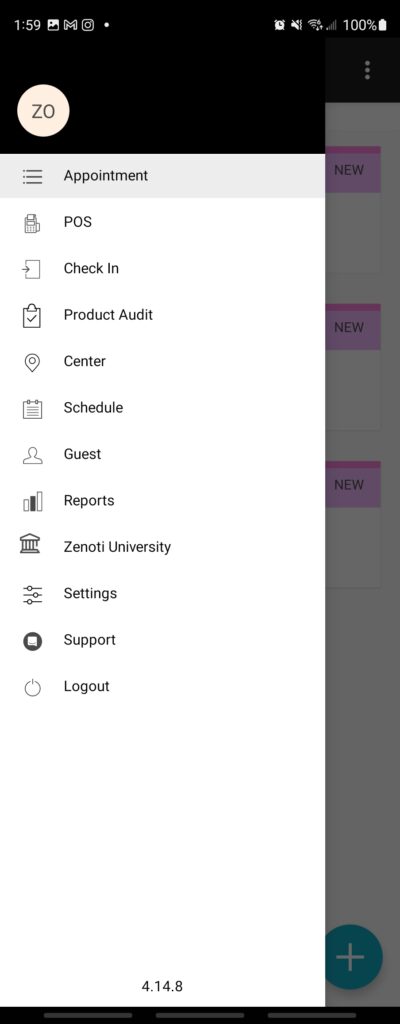
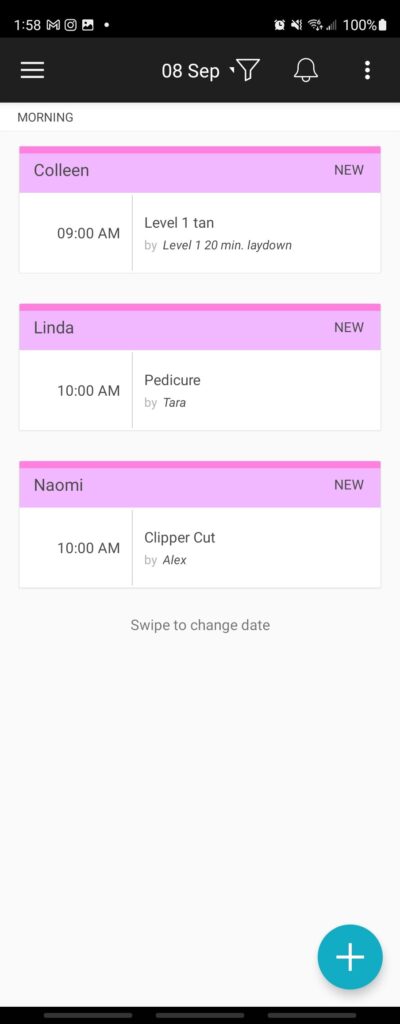
Functionality doesn’t end at POS functions, however. You can also book appointments, view and edit products and inventory, scan reports, and access support.
I have to note that these functions are very much scaled down on the mobile app, and you will need to use the desktop version for many of the more complicated elements of each of these processes.
Think of the app as a supplement to your desktop (full) functionality and expect that it will have considerable limitations in each function.
Consumer Mobile App (CMA)
Just like Mindbody, Zenoti offers you the option of a branded customer-facing app that is tailored to your brand and built for you by their team. This can be added to your monthly subscription fee.
Within the app, clients can see purchased gift cards, review membership benefits and see when they redeemed them, view active and inactive packages, view loyalty points and rewards, and copy their referral code to send to their friends or post on social media (as well as review their earnings from their referrals).
There is also an option to implement geofencing capability so that service providers and the front desk can be notified when their clients arrive.
Clients can be prompted to leave feedback and submit their ratings within the app. You can set up links that go directly to Google, Yelp, Facebook, and other social platforms and encourage clients to share their reviews on those sites as well.

Zenoti Mobile App Reviews
Zenoti Mobile is available on iOS and Android, and the ratings aren’t very promising but are also quite confusing.
Zenoti Mobile has a user rating of 2.6/5 stars (with 365 reviews) on the Apple App Store and a rating of 1.4/5 stars on the Google Play Store (with 932 reviews) as of the writing of this review.
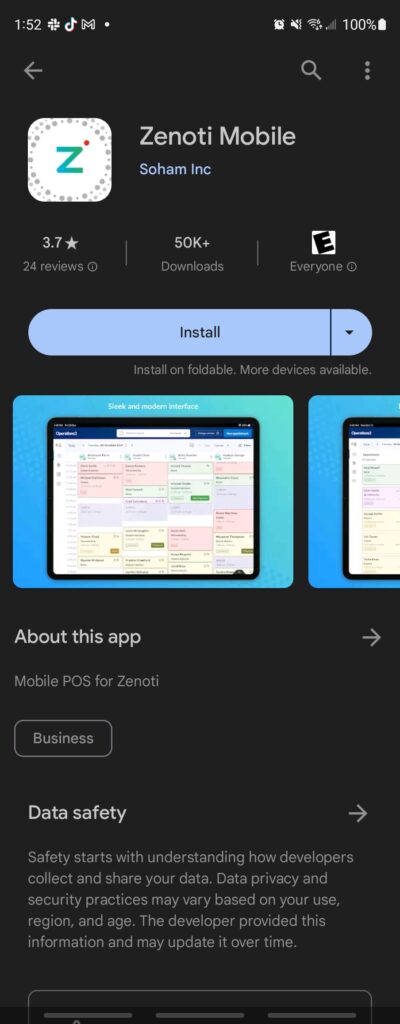
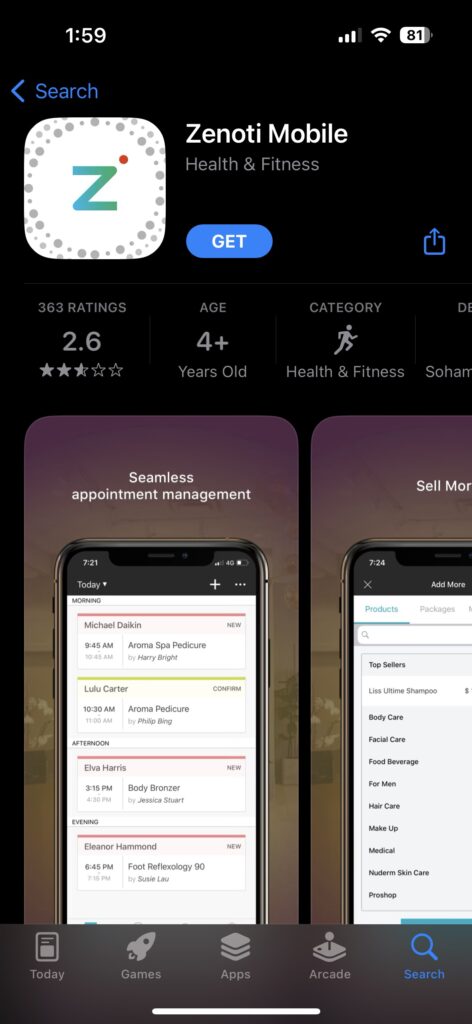
On my first pass through the Google Play Store on an Android phone, the review score was listed as 3.7/5 stars (with 24 reviews); however, when I checked the Google Play Store listing on desktop, the score was listed as an abysmal 1.4/5 stars (with 932 reviews).
This may be due to the fact that depending on which type of device you’re viewing the Google Play Store on and the region you’re accessing it in, the score will change to reflect both of those factors. So a brand new phone in a region with good internet may reflect a better score based on fewer reviews than a more average-tier phone in a more populous area with spotty internet.
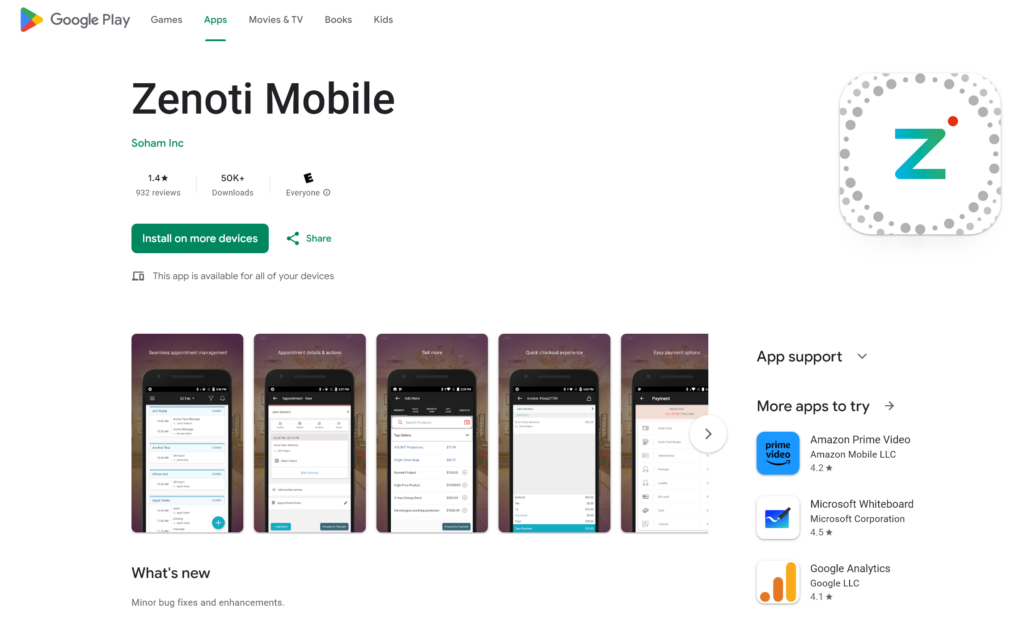
Either way, the trend in bad reviews is significant and indicates that the mobile experience is reflective of Zenoti’s desktop experience — suffering from a clunky interface and a lack of innovation where it counts.
Reviews across both iOS and Android cite the app as glitchy, complain that permissions make navigating the app a mess, and that managing large teams is a frustrating experience.
Likewise, several reviews report constant app crashes and random logouts, incorrect reports and metrics, and the inability to clock in and out.
Others have lamented issues with notifications not getting sent when clients are added to their schedule and even a lack of accessibility for people who are blind or visually impaired due to several unlabeled buttons within the app disallowing screen reader functionality.
And, as is usually the case for salon and spa software, negative feedback is even more prominent on Android, and the app experience is reported to be considerably worse than that of iOS.
I would genuinely like to see Zenoti dedicate considerable effort to improving the mobile experience across both of these platforms.
As I have stated in previous reviews, a good mobile experience is a non-negotiable for service professionals and business owners in 2024.
This is especially true considering the high monthly cost of Zenoti and the year-long minimum commitment that businesses are contractually obligated to once they sign up.
If you’re paying top dollar for a piece of salon software, you should be getting a premium experience across all platforms. You won’t get that with Zenoti.
Salon and spa professionals deserve better than what Zenoti (and Booker, Mindbody, and many other legacy software platforms) are offering in 2024, and you can find a better mobile app experience (at a better price in many instances) elsewhere.
Summary & Conclusion
That’s a wrap! Well, almost.
I sincerely hope you found this review of Zenoti helpful in your search for the right salon and spa software.
Now let’s talk final thoughts:
Overall, Zenoti’s desktop experience is serviceable, but it’s ugly, old, and just as unintuitive as its long-standing competitors.
Let’s start with the good first:
Zenoti is mostly feature-complete and offers every feature that its competitors do. From the marketing suite to two-way messaging and even an AI chatbot, it has those elements available to you (usually for an additional fee).
Where it shines above its competitors is with legitimately better reputation management tools that allow business owners to take control of the conversation around their business online and make client satisfaction their top priority.
They also have a decent help center and offer a series of best practice courses on their Zenoti University site. That’s always something we like to see.
However, despite Zenoti being a veteran in the salon software space, they fail at the same weak points as each of their competitors.
This starts with the terrible mobile app experience on offer across both iOS and Android. Reviews are awful across both platforms going back at least five years, indicating a lack of innovation and improvement to one of the core pillars of any booking software.
This neglect reaches down to the accessibility level, leaving customers with vision impairment simply unable to use the app due to a lack of necessary programming to accommodate their needs.
Likewise, the desktop experience is a bit of a mess. A lack of quality-of-life features and, unsurprisingly, a lack of app labels on the calendar interface make getting the hang of the software a challenge off the bat.
And I feel like I keep having to say this in reviews, but just as was the case with Booker and Mindbody, the same pernicious complacency has led to years of status-quo software experience that has not genuinely innovated beyond carbon copy marketing and communication features.
I wish I could recommend Zenoti more highly, but to be honest, they’re barely outdoing Mindbody and offer a largely similar experience (albeit with a worse UI) to Booker at roughly the same price once you factor in comparable add-on features.
But that’s not to say that it isn’t the right choice for any business.
If you absolutely have to have in-depth reputation management features built into your software and can benefit from the marketing tools, customizable reporting functions, and AI tools available from Zenoti, then it may be a good choice for you and your business.
Request a demo of Zenoti here or check out our complete list of the Best Salon and Spa Software and see how Zenoti stacks up to the best options on the market today.
